Cloudflare and Anthropic have collaborated to integrate Claude Managed Agents with Cloudflare Sandboxes. Our new integration gives you more control over your agent sandboxes, secures connections to private services, and improves observability.
In the past year, Cloudflare’s Developer Platform has expanded to give more developers the tools they need to run agents at scale. This includes:
Sandboxes for full stateful Linux microVMs at scale
Agents SDK, providing simple and customizable agent framework
Browser Run, which gives agents fully programmable and observable browsers
Dynamic Workers, allowing for dynamic sandboxed code execution at massive scale
Our goal is to make Cloudflare the simplest, most secure, and most programmable cloud for agents.
Integrating with Claude Managed Agents is another step in this direction. You can run your agent loop on the Claude Platform, while using Cloudflare to execute code, secure connections, and run custom tool calls.
To get going in just minutes, we’ve created a default deployment template that gives you the following:
Enhanced security - Run all agent traffic through customizable proxies. This allows you to securely inject credentials, prevent data exfiltration, and better observe how your agents interact with the outside world.
Sandbox control and observability - Get detailed sandbox metrics and logs. SSH into running machines. Customize sandbox images.
Lightweight sandboxes - Writing and executing untrusted code can be done in a traditional microVM or a lightweight isolate. This lets you hit massive scale, boot sandboxes in milliseconds, and minimize infrastructure spend.
Private service connectivity - Connect agents to private internal services without ever exposing them to the Internet.
Browser Control and Observability - Get an audit trail of every agent’s browser sessions, including session recording and human-in-the-loop flows.
Email - Give each of your agents its own email address and ability to send emails.
Custom tools - Extend your agents with tools without needing additional infrastructure. Just write functions and deploy.
You get all of this out of the box when deploying the integration, and you can easily customize if you need more.
Let’s take a brief look at Claude Managed Agents, see how to integrate a Cloudflare-based environment, then explore how to get the most out of Claude on Cloudflare.
Claude Managed Agents allow developers to easily define and run agents on the Anthropic platform. In these managed environments, Claude can read files, run commands, browse the web, and execute code. The harness supports built-in prompt caching, compaction, and various agent-first performance optimizations.
Until now, using Claude Managed Agents has meant running the entire stack on Anthropic-provided infrastructure. While this is great for some developers, others may need more control over their infrastructure choice, whether this is for security, compliance, or performance reasons. Self-managed environments for Claude Agents provide just that.
Anthropic describes this as “decoupling the brain from the hands.” The core agent loop runs in Anthropic (the “brain”), but the infrastructure for running and executing code (the “hands”) can be run anywhere, including Cloudflare.
Our new integration gives your agents a Cloudflare-based environment for running and executing code within minutes.
Follow the onboarding guide to get started. Then fork the repo and customize your integration as you see fit.
After setup, when a Claude Agent starts a session, it sends a message to your new Cloudflare-based control plane. The Workers-based control plane gives each agent session a sandboxed environment for executing code, developing applications, running CLI tools, and more. State is automatically persisted across session sleeps.
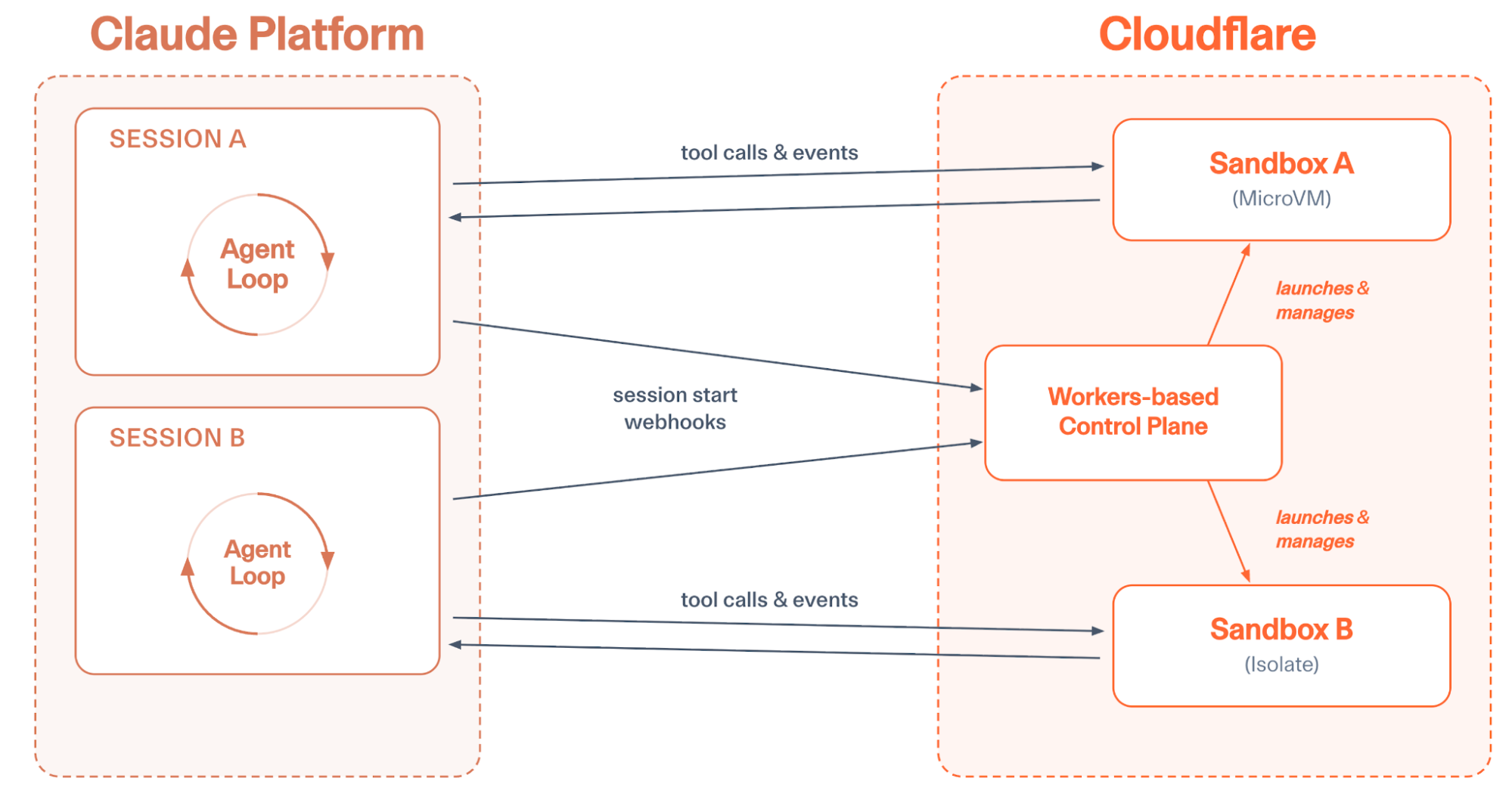
Sandboxes write files and execute code in response to the Claude-based Agent loop
You can optionally configure sandbox instance sizes or customize the container image that runs within VM-based sandboxes. Each sandbox can be observed in the Cloudflare dashboard, sandbox logs can be queried or shipped to external providers like Datadog or Splunk, and the control plane ships with a built-in UI, making it easy to track the state of sandboxes or SSH into specific machines.
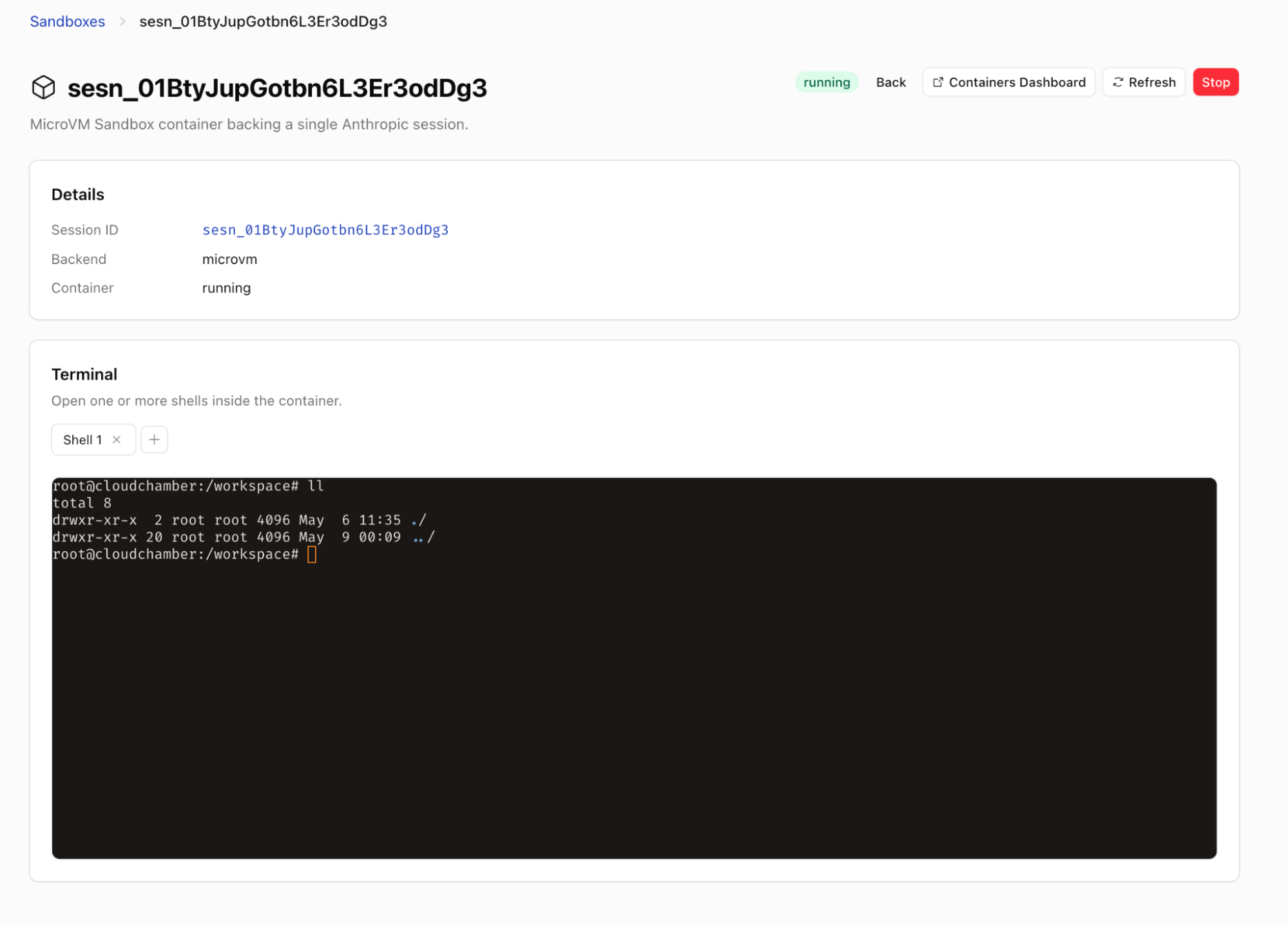
Get interactive shell sessions into your agent’s sandbox
What if your agent backend booted in a few milliseconds, and you didn’t have to pay for the resources of a full VM when running the agent?
The industry needs a lightweight primitive for sandboxing as we adopt agents at scale, and we’re building just that.
But as models get better, we expect more and more workflows to be managed by agents. Each of your customers should be able to run many agents simultaneously; each of your employees should have tens of agents running at once. If we’re constantly running a full microVM per agent, we’ll be unnecessarily burning a ton of resources and money to enable this scale.
That’s why we’re providing a faster and cheaper sandbox for your Claude Agents. This sandbox is based on the AgentsSDK. You can execute arbitrary code in Dynamic Workers using Codemode, and you still get a file system, but your agent is doing all of this within a V8 isolate instead of a microVM.
If you need agents to act as a developer, building full applications and running Linux-based tools, you can still reach for a microVM-based sandbox. For this, we provide Cloudflare Containers, which Claude Managed Agents can also use.
But if you want a faster, cheaper, and more scalable alternative you can use isolates instead of microVMs easily. Just select “isolate” for backend type when setting up an Agent.
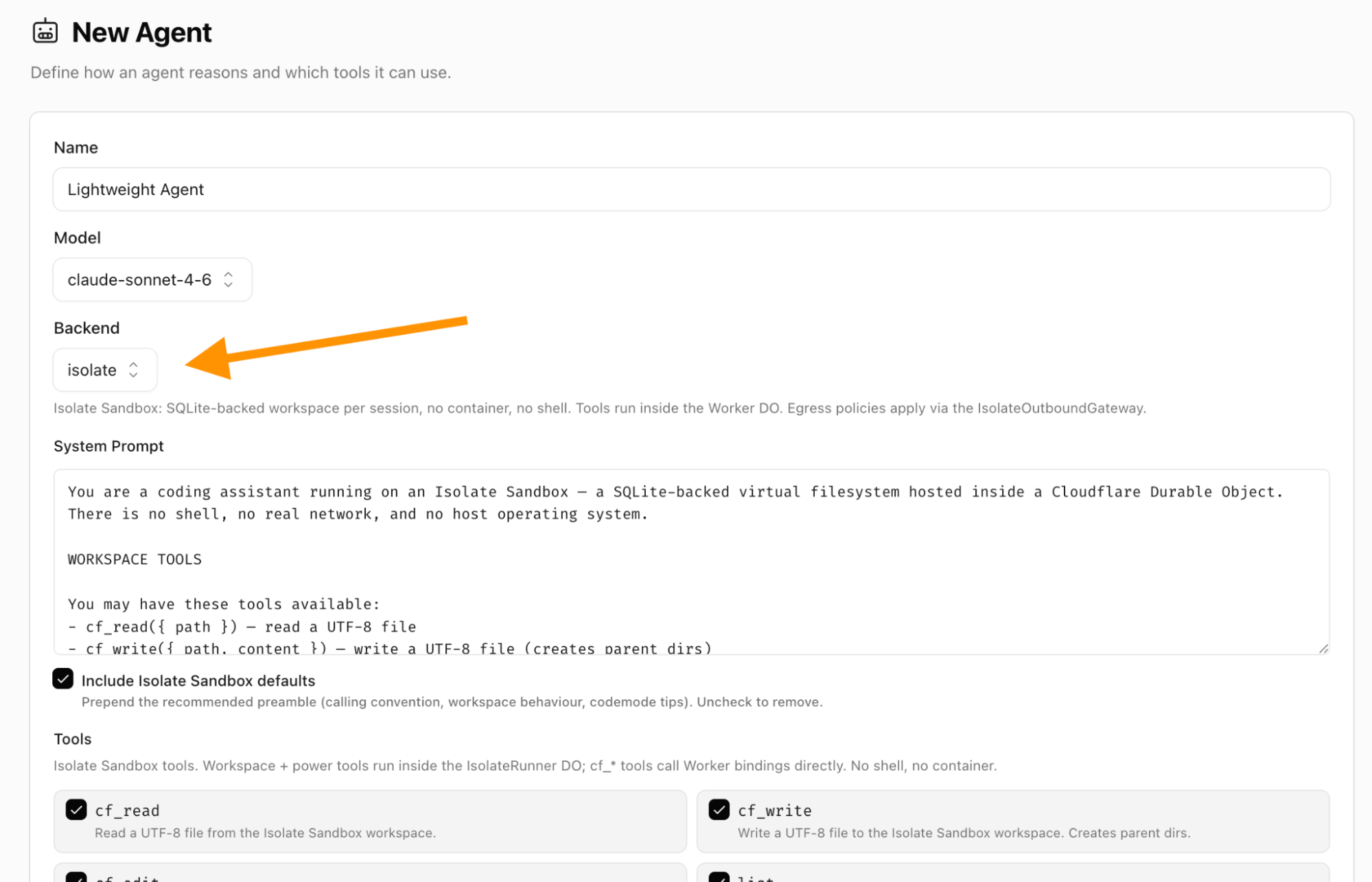
Setting up an “isolate” backend gives you a lightweight V8 isolate sandbox instead of a microVM
If you want to handle bursts of tens of thousands of concurrent agents or more, running with isolates will allow you to scale in a way that no VM-based solution allows.
Agents are far more powerful when they connect to your organization’s context. This usually means accessing private services and data.
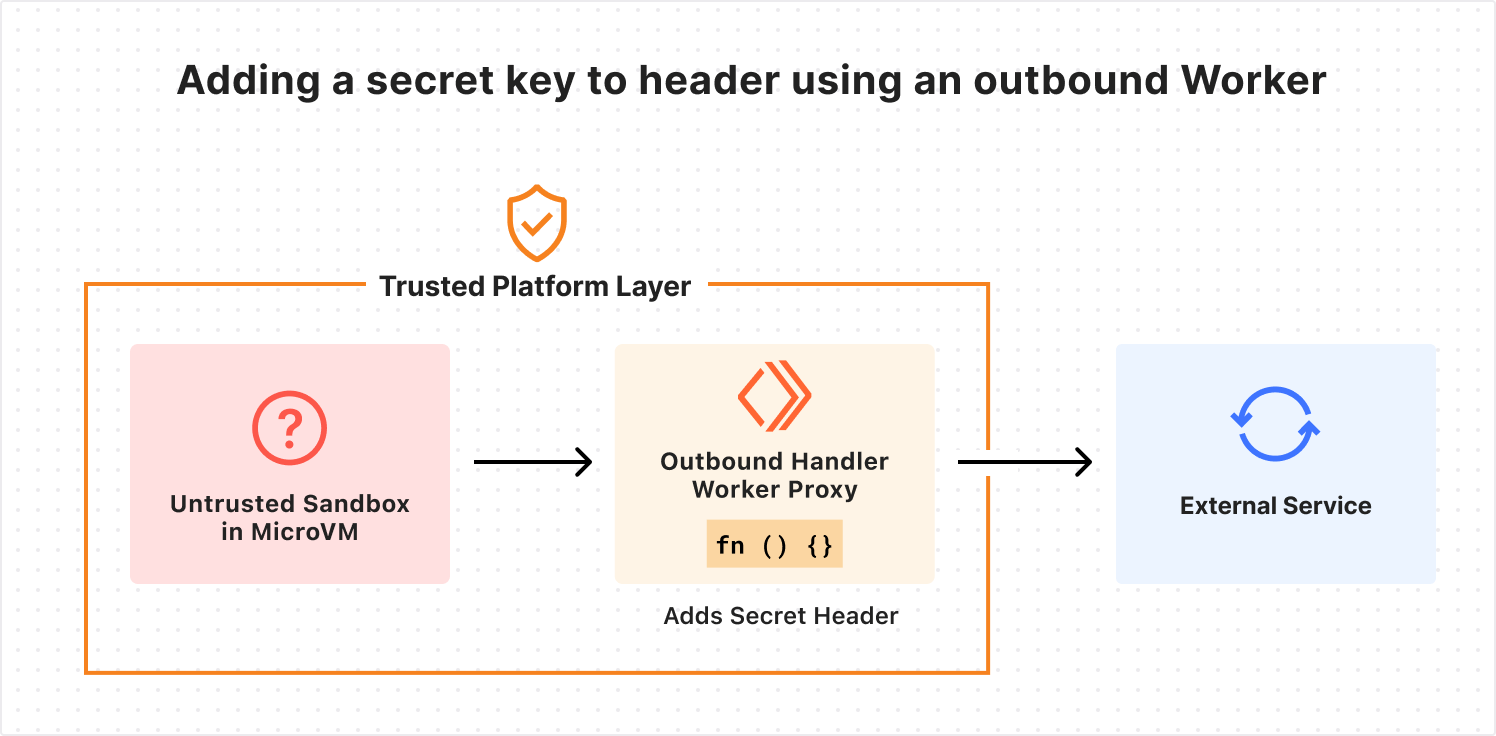
As we’ve written before, sandboxed workloads on Cloudflare can use an outbound proxy for fully dynamic, customizable, and zero-trust authentication between sandboxes and external services. This lets you inject secrets into requests outside the sandbox, so the agent never has access to them. This protects against exfiltration attacks.
And sometimes internal services shouldn’t ever be exposed to the open Internet. We recently launched Cloudflare Mesh and Cloudflare Workers VPC to better connect to these private services, whether they’re running on a cloud provider like AWS or on-premises. This allows you to connect to internal services using post-quantum encrypted networking without a VPN or bastion host.
Claude Managed Agents can easily connect to private services with header injection or private VPC/Mesh tunnels. This is done via customizable outbound proxies. You can define egress policies that expose only the services you choose to the agent sandboxes that you choose. You can allowlist specific endpoints, perform zero-trust injection of encrypted credentials, access private services via Cloudflare Mesh, and even write custom proxy middleware.
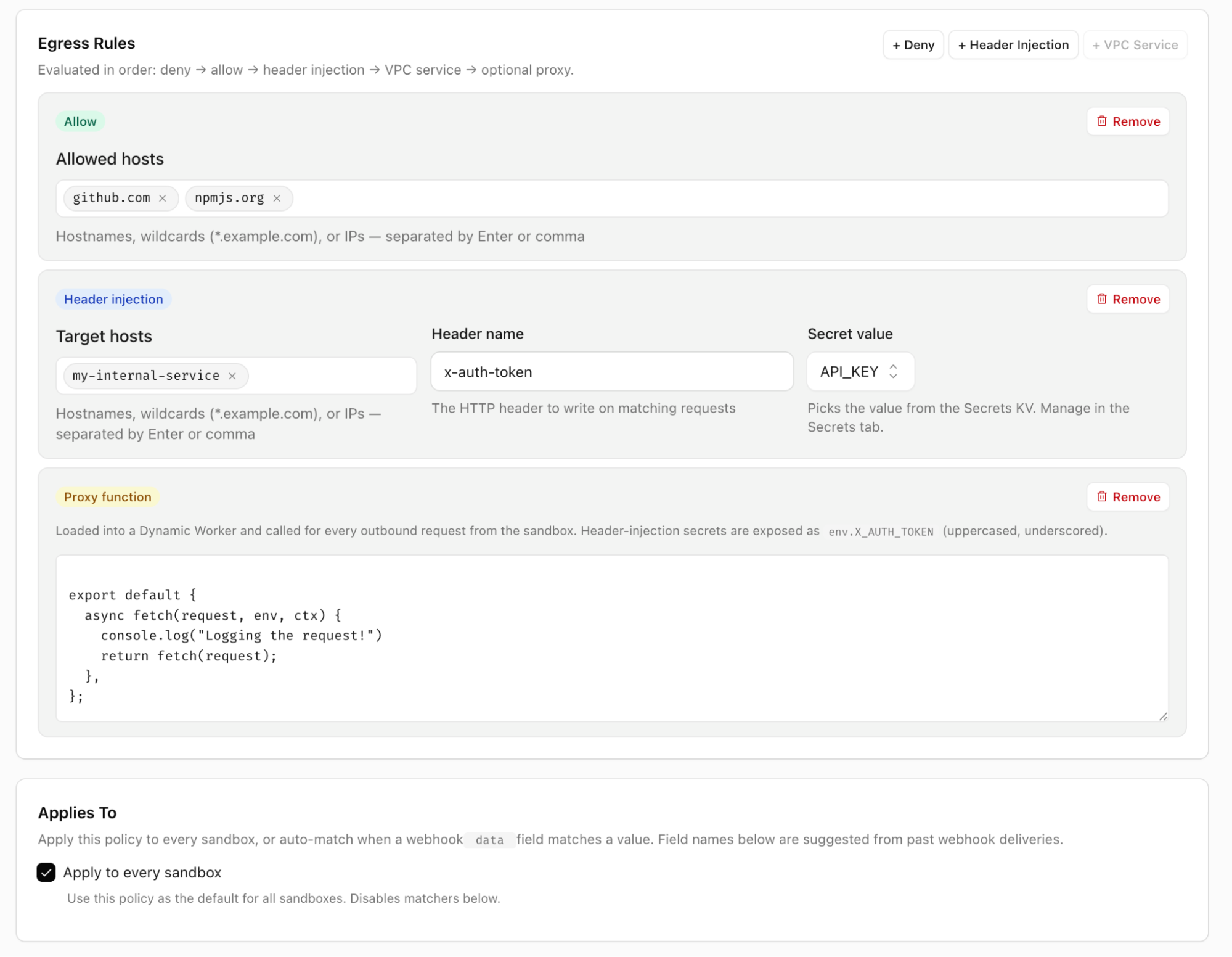
The integration uses outbound Workers to handle egress however you see fit
You’re able to apply policies per tenant, per agent, or based on whatever metadata is useful. This gives you full control over how your agents connect to external services.
Agents need more than just a code execution environment. Cloudflare’s Developer Platform provides the tools you need by default to let your agents do more.
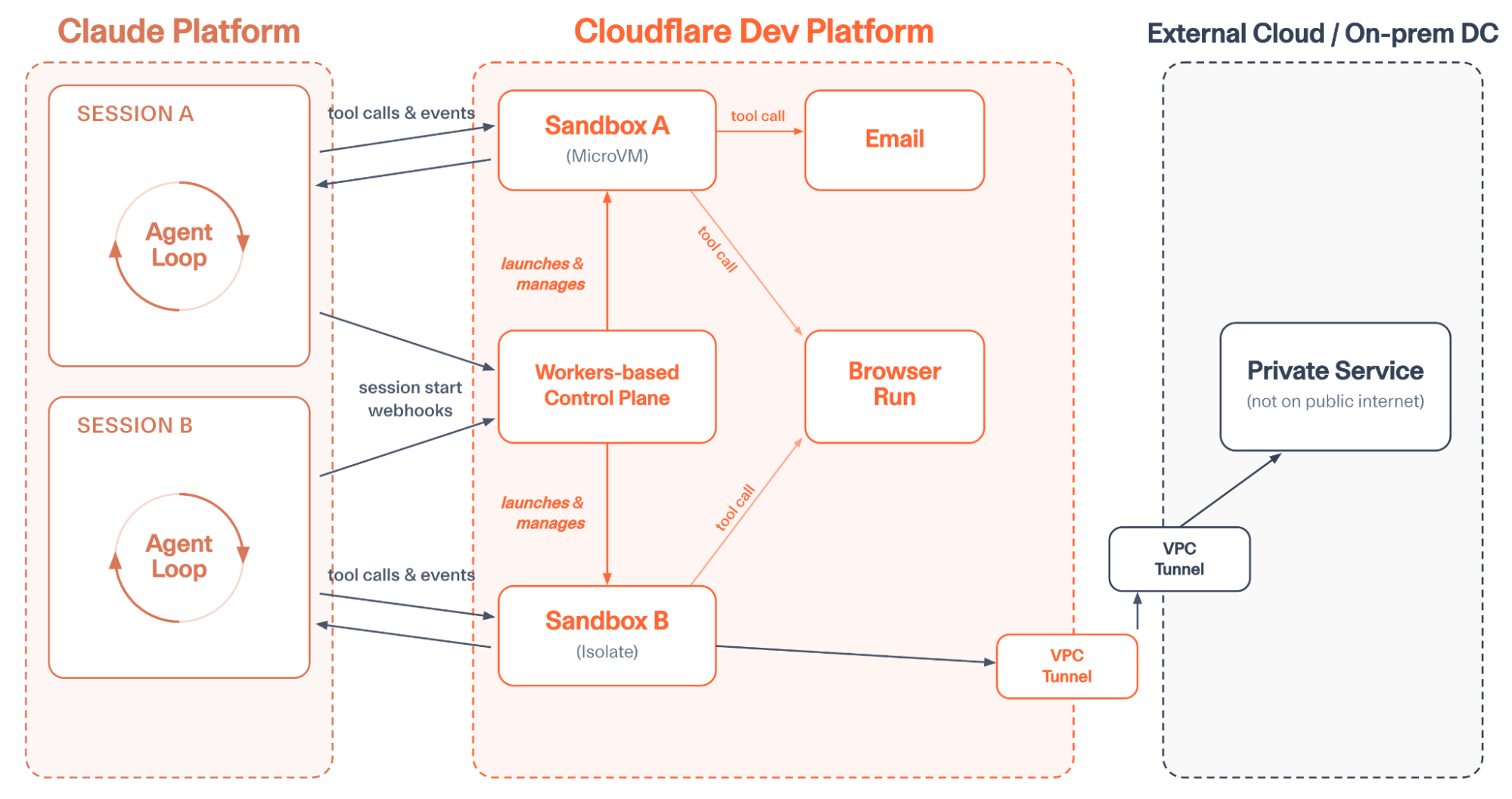
Sandboxes can make tool calls on Cloudflare and safely access external services.
Here are a few of the tools you’ll find most useful as you deploy agents on Cloudflare:
One of the most common tools agents need is a browser. While curl can get you pretty far, when you want an agent to act like a human, this often means interacting with the web like one: rendering JS-heavy applications, taking screenshots for QA validation, filling out forms, etc. Browser Run is Cloudflare’s tool to give agents browsers.
A Browser Run session recording lets you watch how your agents used a browser. One of many built-in tools.
The Claude Managed Agents integration ships with multiple browser-related tools that can be enabled immediately. These include browser_search, browser_execute, screenshot, browse, fetch_to_markdown, and a Cloudflare-specific implementation of web_fetch allows your agent to control a browser that runs on Cloudflare infrastructure. This not only lets your agent do more, but it also makes it easy to audit every action your agent’s browser is taking on the web, apply allowlists and denylist to browser sessions, and save recordings of browser sessions for future debugging.
The integration also comes with built-in support for email with the send_email, email_read, and email_list tools.
You can also kick off new sessions via email, or configure the agent to send emails using any domain and address configured with the Cloudflare Email Service. This allows the agent to act on your behalf when it needs to, reply to context in forwarded emails, and autonomously interact with others via email.
Other built-in tools include call_service, which uses Cloudflare Mesh or Workers VPC to connect to private services, and image_generate, which uses Workers AI to generate images on Cloudflare. This pairs well with Claude providing text-based inference.
Additionally, we encourage forking the repo to easily add customized tools. For example, you could add a custom tool to host a public file on Cloudflare’s R2 object storage. Just add the relevant binding in wrangler config, write a zod definition, and short function in custom-tools.js:
defineTool({
  name: "r2_host_file",
  description: "Upload from sandbox to R2 and get a public URL.",
  inputSchema: z.object({
    key: z.string().describe("Object key"),
    content: z.string().describe("UTF-8 file body"),
    contentType: z.string().describe("MIME type"),
  }),
  run: async ({ key, content, contentType }, { env }) => {
    await env.PUBLIC_BUCKET.put(
      key, content, { httpMetadata: { contentType }}
    );
    return `${env.PUB_R2_URL.replace(/\/$/, "")}/${encodeURI(key)}`;
  }
}),
The Cloudflare Developer Platform provides all sorts of possibilities for extending your agents: give each agent session a git-backed repo with Artifacts, run edge inference with Workers AI, host applications written on the fly with Dynamic Workers, and more.
You don’t have to worry about infrastructure or scaling – just write a few lines of code and hit deploy.
We’re excited to be working together with Anthropic to bring Cloudflare’s flexibility, scale, and security to more users. Whether you want to run tens of millions of agents using isolates, securely connect to private services with Workers VPC, or write custom tools that take advantage of all of Cloudflare, our new integration makes it easy.
See the Getting Started with Managed Agents guide to get Claude Managed Agents set up with Cloudflare in just minutes.